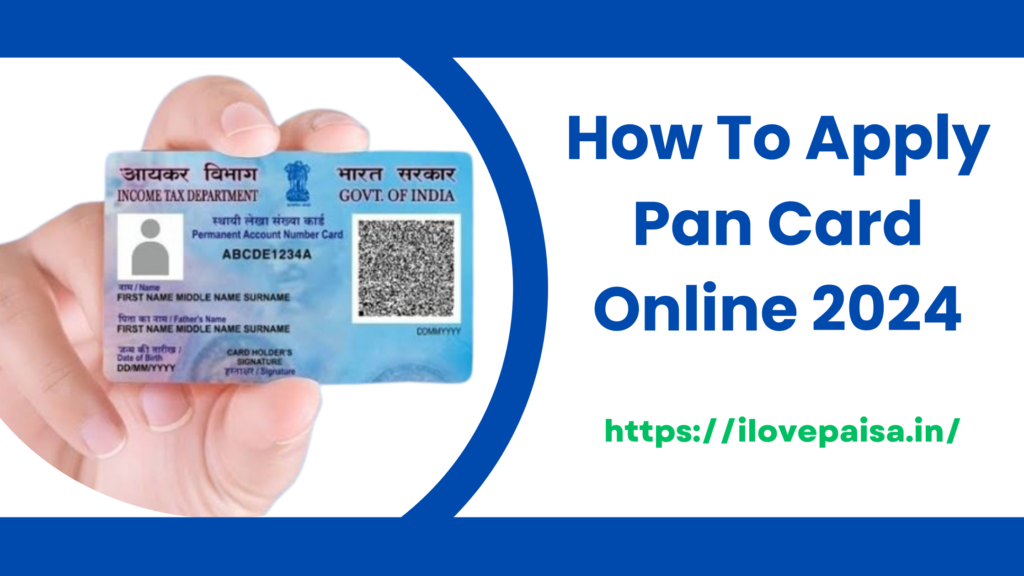

𝗛𝗼𝘄 𝘁𝗼 𝗮𝗽𝗽𝗹𝘆 𝗳𝗼𝗿 𝗮 𝗻𝗲𝘄 𝗣𝗔𝗡 𝗰𝗮𝗿𝗱 𝗼𝗻𝗹𝗶𝗻𝗲
Apply Pan Card Online పాన్ కార్డ్ అనేది మనకు చాలా ఉపయోగపడుతుంది. పాన్ కార్డ్ అనేది మనకు Income Tax Department of India అందజేస్తుంది. PAN Card Meaning ఏంటంటే [ 𝗣𝗲𝗿𝗺𝗮𝗻𝗲𝗻𝘁 𝗔𝗰𝗰𝗼𝘂𝗻𝘁 𝗡𝘂𝗺𝗯𝗲𝗿 ] దీన్నే PAN Card అని అంటారు. Pan card లో 10 అంకెల number అనేది ఉంటుంది . ఈ pan card అనేది మనకు financial transactions కి,filling income tax returns కి , అలాగే proof of identify కి ఇలా మనకు ప్రతిదానికి ఈ pan card అనేది చాలా ఉపయోగపడుతుంది.
ఈ రోజుల్లో మనం pan card apply చేయడం అనేది చాలా easy గా ఉంది. ఇంకా online లో apply చేయడానికి చాలా Services అనేవి ఉన్నావి. ఇప్పుడు మనం online లో pan card నీ ఎలా apply చేయాలో అనేది 𝗦𝘁𝗲𝗽 𝗕𝘆 𝗦𝘁𝗲𝗽 తెలుసుకుందాం. అందుకోసం మీరు ఈ Article నీ స్పష్టంగా పూర్తిగా చూసి apply చేయండి.. మీకు ఈ article లో చాలా calrity గా step by step తెలుస్తుంది.
𝗦𝘁𝗲𝗽 :-1 𝗩𝗶𝘀𝗶𝘁 𝗧𝗵𝗲 𝗢𝗳𝗳𝗶𝗰𝗶𝗮𝗹 𝗪𝗲𝗯𝘀𝗶𝘁𝗲
ముందుగా మనం పాన్ కార్డ్ కోసం ఆన్లైన్ లో అప్లై చేసుకోవడానికి మనకు 2 Websites ఉన్నవి.
NSDL అంటే (𝗡𝗮𝘁𝗶𝗼𝗻𝗮𝗹 𝗦𝗲𝗰𝘂𝗿𝗶𝘁𝗶𝗲𝘀 𝗗𝗲𝗽𝗼𝘀𝗶𝘁𝗼𝗿𝘆 𝗟𝗶𝗺𝗶𝘁𝗲𝗱 )
UTTIITSL అంటే (𝗨𝗧𝗜 𝗜𝗻𝗳𝗿𝗮𝘀𝘁𝗿𝘂𝗰𝘁𝘂𝗿𝗲 𝗧𝗲𝗰𝗵𝗻𝗼𝗹𝗼𝗴𝘆 𝗔𝗻𝗱 𝗦𝗲𝗿𝘃𝗶𝗰𝗲𝘀 )
ఈ రెండు Websites ద్వారా మనం పాన్ కార్డ్ అనేది అప్లై చేసుకోవాచ్చు. ఇప్పుడు మీకు pan card apply ఎలా చేయాలి అని తెలియడం కోసం ఉదాహరణగా చే NSDL website నీ తీసుకొని మీకు చూపిస్తాను.
𝗪𝗲𝗯𝘀𝗶𝘁𝗲 𝗡𝗮𝗺𝗲:- NSDL PAN Services.
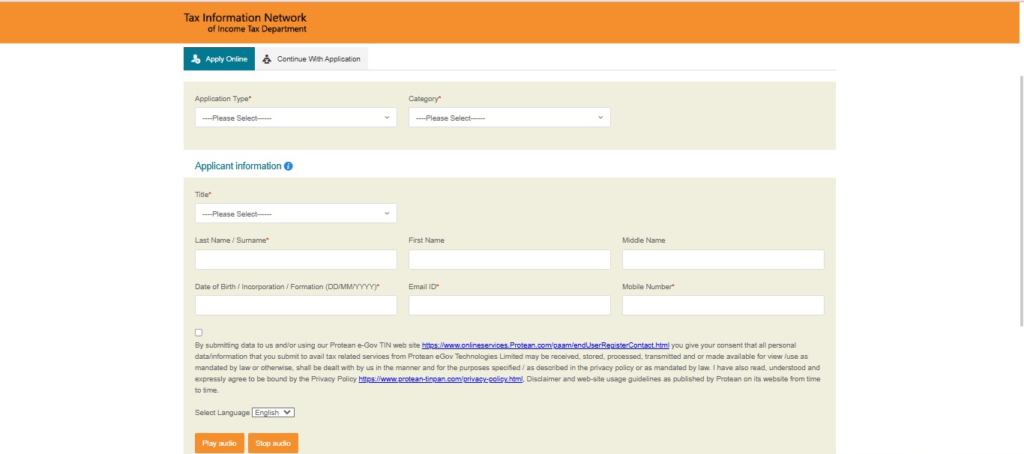
𝗦𝘁𝗲𝗽:-2 మీరు గానుక NSDL Webiste లో pan card apply చేద్దాం అనుకుంటే. నేను చెప్పే ఈ steps Follow అవ్వండి.
𝗦𝗲𝗹𝗲𝗰𝘁 𝗔𝗽𝗽𝗹𝗶𝗰𝗮𝘁𝗶𝗼𝗻 𝗧𝘆𝗽𝗲 :
Choose ” 𝗡𝗲𝘄 𝗣𝗮𝗻 – 𝗜𝗻𝗱𝗶𝗮𝗻 𝗖𝗶𝘁𝗶𝘇𝗲𝗻 (𝗙𝗼𝗿𝗺 49𝗔)” If your indian citizen
లేదా మీరు india కు చెందినవారు కాకపోతే
Choose “𝗡𝗲𝘄 𝗣𝗮𝗻 – 𝗙𝗼𝗿𝗲𝗶𝗴𝗻 𝗖𝗶𝘁𝗶𝘇𝗲𝗻 (𝗙𝗼𝗿𝗺 49𝗔𝗔)” If your 𝗙𝗼𝗿𝗲𝗶𝗴𝗻 citizen ఇలా మీరు ఏ దేశానికీ చెందివారు అనేది category ప్రకారంగా choose చేసుకోవలసి ఉంటుంది.
Drop down menu నుండి సరైన category నీ సెలెక్ట్ చేసుకోవాలి.
Options include
->Individuals.
->Association of persons.
->Body of individuals.
->Company.
->Trust Etc.
𝗙𝗶𝗹𝗹 𝗜𝗻 𝗣𝗲𝗿𝘀𝗼𝗻𝗮𝗹 𝗗𝗲𝘁𝗮𝗶𝗹𝘀 :
Enter your title (Shri, Smt, Kumari, etc.).
Provide your last name/surname, first name, and middle name (if applicable).
Fill in your date of birth or incorporation/formation (for entities).
Provide your email address and mobile number.
Enter the captcha code.
ఇలా ఇవి అన్ని details, click fill చేసిన తరువాత “Submit” button. పై click చేయాలి.
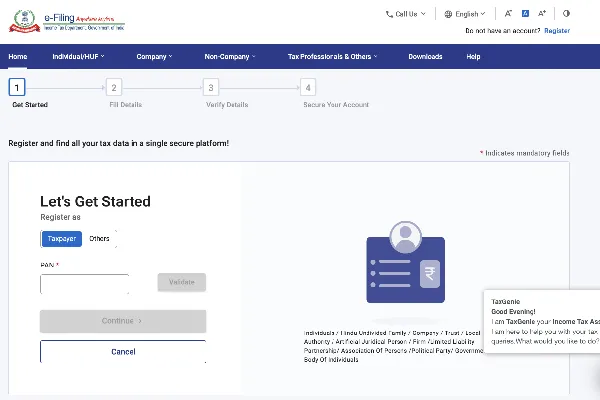
𝗦𝘁𝗲𝗽:-3 Enter Our 𝗣𝗲𝗿𝘀𝗼𝗻𝗮𝗹 𝗗𝗲𝘁𝗮𝗶𝗹𝘀
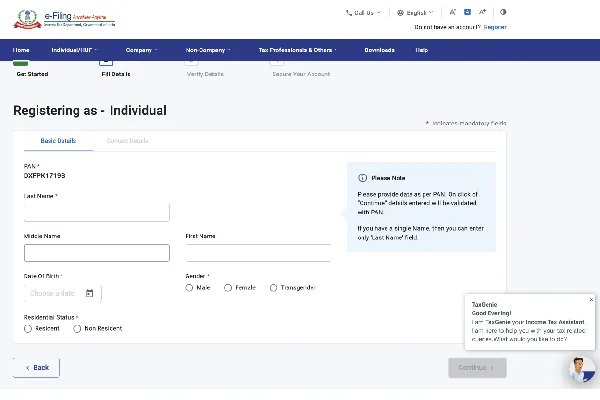
PAN card application form fill చేసిన తరువాత. మీకు కొత్త page అనేది open అవుతుంది. అందులో మనం మన full details నీ ఇవ్వాలి fake details నీ మాత్రం ఇవ్వకూడదు.
𝗣𝗲𝗿𝘀𝗼𝗻𝗮𝗹 𝗗𝗲𝘁𝗮𝗶𝗹𝘀:
Father’s Name: Enter your father’s last name/surname, first name, and middle name.
Mother’s Name: Enter your mother’s name (optional, but recommended).
Gender: Select your gender (male, female, or transgender).
Date of Birth: Confirm your date of birth.
Contact Details: Address : మీరు మీ address correct గా ఇవ్వాలి. మీరు ఉంటున్నా house and అలాగే మీ office address అయితే ఇవ్వాలి. ఇంకా
ముఖ్యంగా ఉండవలసినవి flat/room number, name of the premises/building, road/street/lane, area/locality, town/city, district, state/union territory, and PIN code. Telephone and Email: Provide a valid telephone number and email address ఇవి అయితే మీరు స్పష్టంగా correct గా check చేస్తూ ఇవ్వాలిసి ఉంటుంది.
Proof of Identity, Address, and Date of Birth:
proof of identity (POI), proof of address (POA), and proof of date of birth (DOB) ఇవి అయితే చాలా important.
Aadhaar card, voter ID card, driving license, passport, and Birth Certificate common గా ఇవి అయితే ప్రతి దానికి కావాలి.
Other Details:Aadhar Number మీ యొక్క ఆధార్ నెంబర్ ఉంటే నమోదు చేయండి. ఆధార్ తో మీ pan nu Link చేసుకోండి అలా చేస్తే మీకు application process అనేది చాలా సులభంగా అవుతాది.Sources of income : మీ యొక్క income అనేది ఎక్కడి నుండి మీరు సంపాదిస్తున్నారు అనేది కూడా మీరు ఇక్కడ ఇవ్వాలి
Ex:- (salary, business/profession, income from house property, capital gains, etc.).
Representative Assessee :If applicable, provide details of the representative assessee. అంటే మీ తరుపున tax related matters ఉన్న వ్యక్తి వివరాలను కూడా ఇవ్వాలి.
𝗦𝘁𝗲𝗽 4 : Choose the Mode of Submission
ఇక్కడ Pan application and Supporting Documents submitte చేయడానికి మూడు రకాలుగా ఉన్నవి. అవి ఏంటో తెలుసుకుందాం.
Forward Application Documents Physically:
Print the acknowledgment(రసీదు) receipt, attach the required documents, and send them to the NSDL e-Gov office by post.
Submit Digitally through e-KYC & e-Sign:ఇక్కడ మీ photo నీ , శిగ్నతురె నీ , scan చేసి అలాగే supporting documents నీ uplode చేయవలసి ఉంటుంది.ఇంకా మీరు ఆధార్ card కలిగి ఉండటం వలన మీకు ఇది otp (one Time Password ) గా నిర్దారించబడుతుంది (These will be verified through Aadhaar OTP )
𝗦𝘁𝗲𝗽 5: Payment of Fees
Application fee అనేది మీరు physical PAN card or an e-PAN card (electronic PAN card) ఎటువంటి pan card నీ తీసుకోవాలి అనుకుంటున్నారో దాని పై fee అనేది ఆధారపడి ఉంటుంది.
For a physical PAN card, the fee is ₹107 (including taxes) for Indian communication addresses.and ₹989 (including taxes) for foreign communication addresses.For an e-PAN card, the fee is ₹72 (including taxes).Payment can be made via credit/debit card, net banking, or demand draft. Follow the instructions on the website to complete the payment process.
𝗦𝘁𝗲𝗽 6: Upload Documents and Submit Application
Based on your selected mode of submission.𝗨𝗽𝗹𝗼𝗱𝗲 𝗗𝗼𝗰𝘂𝗺𝗲𝗻𝘁𝘀 (𝗜𝗳 𝗔𝗽𝗽𝗹𝗶𝗰𝗮𝗯𝗹𝗲) అవసరమైన documents (𝗣𝗢𝗜, 𝗣𝗢𝗔, 𝗗𝗢𝗕)నీ 𝘀𝗰𝗮𝗻 చేసిన documents నీ uplode చేయండి.
𝗩𝗲𝗿𝗶𝗳𝗶𝗰𝗮𝘁𝗶𝗼𝗻:మీరు application form లో enter చేసిన details నీ verify చేయండి. మీరు fill చేసిన details అనేవి సరైనవని మరియు supporting documents కి match అవుతున్నాయా లేదా చూసుకోండి.
𝗦𝘂𝗯𝗺𝗶𝘁 𝗧𝗵𝗲 𝗔𝗽𝗽𝗹𝗶𝗰𝗮𝘁𝗶𝗼:Click on the “Submit” button to complete the application process.
𝗦𝘁𝗲𝗽 7: Acknowledgment and Tracking
Successful గా Submission చేసిన తరువాత. మీకు 15 అంకెల (digits) కలిగిన రసీదునీ పొందుతారు. This number can be used to track the status of your PAN application.
Tracking Your Application:
Visit the NSDL PAN tracking page: Track PAN Application.
Enter your 15-digit acknowledgment number.
Click on the “Submit” button to view the current status of your application.
Receiving Your PAN Card.
మీరు physical PAN Card ను ఎంచకున్నట్లుయితే, అది 15-20 పని రోజుల్లో మీ adress కి పోస్ట్ ద్వారా పంపబడుతుంది.
మీరు e-PAN ను ఎంచకున్నట్లుయితే it will be sent to your registered email address in a downloadable format.
Common Issues and Solutions.
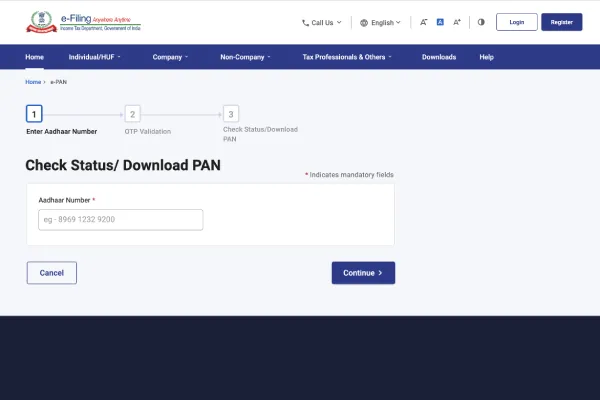
Application Rejection:
అన్ని వివరాలను fill చేసారా లేదో అలాగే submit చేసిన documents clear గా అవి illegal కాకుండా ఉన్నావా లేదా అనేది ఒక్కసారి check చేసుకోండి.Double-check the names, date of birth, and other critical information for any spelling mistakes.
Payment Issues: In case of payment failure, retry the payment process. If the amount has been debited but not reflected, it may take a few hours to update.ఒకవేళ మీ documemts అనేవి verify అవ్వకపోతే మీరు మరల resubmit చేయాలివలసి ఉంటుంది లేదా provide additional documentation as requested by NSDL.
Conclusion
Applying for a new PAN card online is a straightforward process that saves time and effort compared to offline methods. By following the detailed steps outlined in this guide, applicants can ensure a smooth and hassle-free experience. PAN is an essential document for financial transactions and tax-related activities, making it imperative for all eligible individuals and entities to obtain one. With the convenience of online applications, getting a PAN card has never been easier.
𝗛𝗼𝘄 𝗧𝗼 𝗔𝗽𝗽𝗹𝘆 𝗣𝗿𝗮𝗱𝗵𝗮𝗻 𝗠𝗮𝗻𝘁𝗿𝗶 𝗔𝘄𝗮𝘀 𝗬𝗼𝗷𝗮𝗻𝗮 2024